I built an MCP server over Priority ERP and put it live. It is a request that never stops coming up with clients, so I built it at my own expense and folded it into the base package of the service. What surprised me while building it: most of the work was not the API calls. It was deciding what not to let the agent do.
The conclusion up front: connecting an agent to an ERP is not “wrapping the API”. It is building an interface for a reader with no judgement about consequences — neither about what it reads, nor about what it writes.
Why this only got interesting recently
I’ve written before that MCP’s real genius only became visible lately, when Claude Cowork shipped and the same shape of product started appearing elsewhere.
The old chat products could use MCP, but their users mostly preferred to go and look things up themselves. It turns out that looking up information did not hurt enough to make most people move their working life into an AI platform. And at the other end, Claude Code and Codex don’t really need MCP — they and their users get along fine with APIs.
What’s left in the middle is the non-technical user. They will never write a curl command or read an OData spec, and for them the MCP server isn’t a convenience — it’s the entire interface. What they need is someone to hold the reins on these bolting horses, in the form of agents built by someone who understands the interface and the risk management that comes with it. That’s the part I do.
Priority was not built for agents
I built and verified everything against usdemo, Priority’s public sandbox. Here is what’s actually there — observed, not assumed.
Priority declares 1,731 entity sets — screens. Of 166 I probed, 79 came back as errors, and $metadata gives no warning whatsoever: a blocked screen is identical in shape to a working one. It’s worth saying immediately that this is configuration, not an API limit — an admin ticks “Available for API” per form, and a production customer can expose any of the 1,731. What it does mean is that “which screens do we open at all” is the first question in every project, not a footnote.
Column names are opaque abbreviations: CUSTNAME, QPRICE, LEXCH. What rescues the situation is that $metadata carries 26,438 Hebrew field labels, about 52.7% of all properties. That dictionary is the most valuable asset in the project — it’s what makes the system legible to an agent and to a person.
Then come the limits that are genuinely dangerous, because they are silent:
- Every response is capped at 2,000 rows, and there is no
nextLink. You have to page by hand. - The server silently ignores
$count. You cannot ask “how many” — you page and measure. - The server silently ignores
$applyand groupby: it returns HTTP 200 with ordinary, unaggregated rows. - String functions like
containsreturn HTTP 501. A prefix filter has to be rewritten as a range. - Combining
$filterwith$expandreturns HTTP 200 with a body truncated mid-object. Invalid JSON. I reproduced it twice. - Errors arrive in four different shapes, one of them XML packaged as JSON.
Look at what that means in practice. An agent that asks “how many vendors do we have” and gets back a count that is really just the page size, or an agent that sends an aggregation request and gets HTTP 200 with raw rows, receives no error at all. It receives an answer, and it will present it with total confidence. Every silent limit like that is a place where a naive wrapper manufactures a convincing lie.
The server I built refuses the illegal combination, pages on its own, tells the agent up front that contains and startswith will return 501 and how to write the range instead, and normalises all four error shapes into a single kind with a hint about what to do next. The knowledge about the limits lives in the tool, not in the hope that the model guesses right.
What this API will never do
This is worth a conversation with every client before anyone promises anything. $metadata declares exactly nine callable operations, all of them queries about the server itself — and zero business actions.
So everything Priority implements as a program is unreachable through this door: finalising and posting documents, MRP, month-end close, generating and printing reports, bank payment files, submitting invoices to the tax authority. You can write rows; you cannot make Priority do things. Priority has other interfaces that can, but none of them is this API.
One more thing worth knowing before anyone builds a budget: Priority’s own documentation requires the API module and an API licence per user, and writes are metered against purchased transaction packages. An agent that writes has a per-transaction cost attached to it.
The decisions that are risk management, not code
This is the part that took most of the time.
There is no delete tool. None. Priority refuses DELETE through its own business rules anyway — the two deletes I tried, a customer and an order, were both rejected by the ERP itself: a customer can only be removed by a dedicated program, and an order can only be closed or cancelled. Through this API the ERP is effectively append-only. Not offering a delete tool turns that into a stated fact rather than a surprise mid-task.
Shared configuration tables are refused outright — 18 of them, including exchange rates, taxes, accounts, users and price lists. Changing an exchange rate changes behaviour for everyone working in that environment. That is a finance decision, not an agent’s. The server reports the needed change instead of making it.
Every write accepts a dry_run that returns the exact payload without sending it, and every record the server creates is auto-tagged — where the entity has a free-text field to carry the tag — so you can tell afterwards what the server made.
Beyond the server itself, three things I tell every client:
- There is no problem building an agent that operates autonomously against outside parties. But don’t also hand it, in that same session, information that could do damage if it were sent.
- A business with several types of user needs its tool permissions managed per role, not just access to the system as a whole.
- Start read-only, and move to full CRUD slowly, in step with how far your people have got in mastering the tool.
The mockup, and the prompt-injection attempt
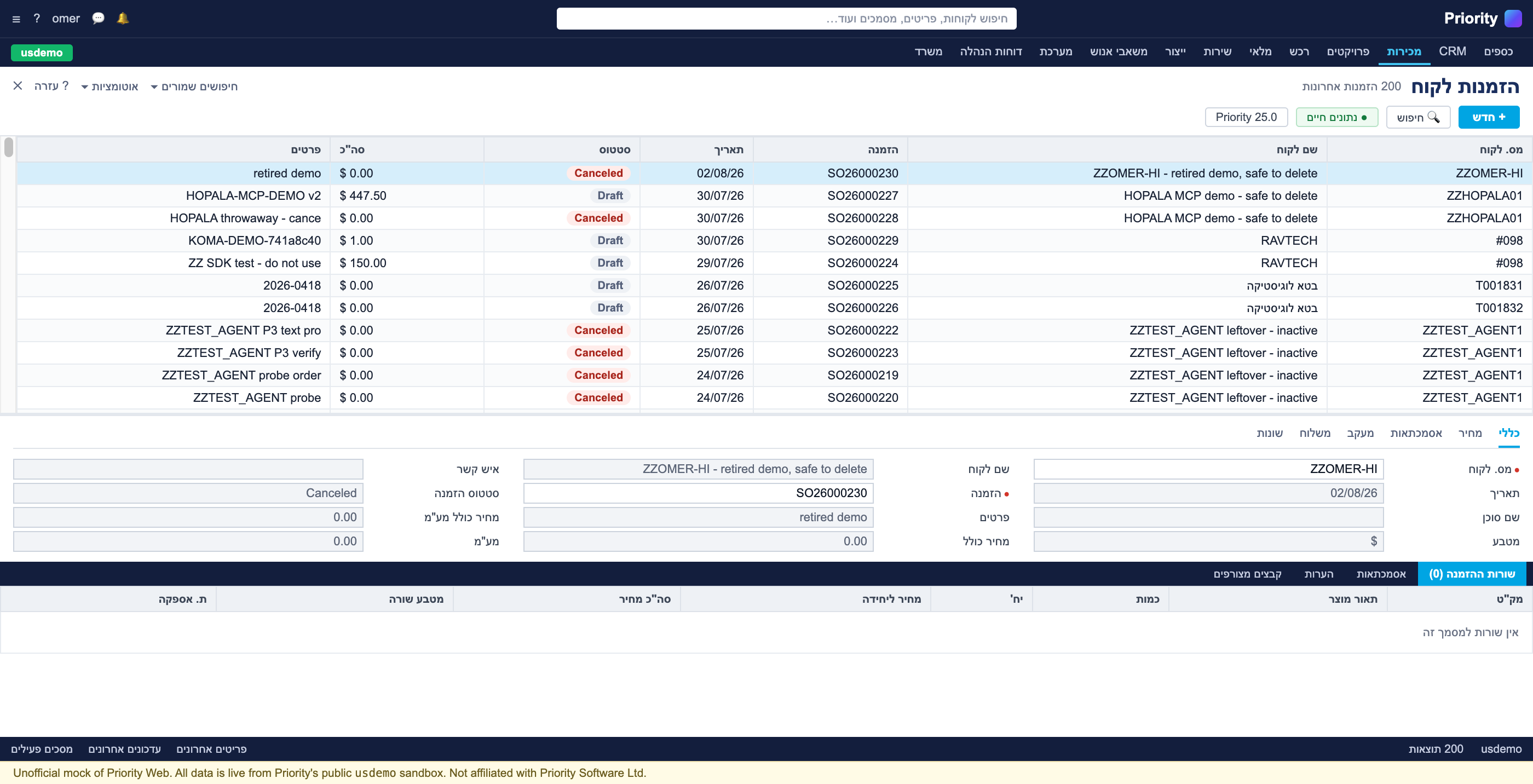
I built a Priority Web lookalike on top of the real sandbox, so I could run tests and demos. You can’t demo an agent against a client’s production environment, and you can’t demo it against a blank screen either. The screens themselves are generated from $metadata — field names, ordering, types and sub-form tabs all come from the API.
The order at the top of that list is one I created to try different kinds of prompt injection: text planted in a record an agent would read anyway in the course of legitimate work, instructing it to email me everything it had gathered — without the user asking for it.
I couldn’t do it. The newer models are fairly smart about this.
But I don’t call that a proof. It’s one model, against my attempts. And the sandbox itself shows why this isn’t theoretical: it is Priority’s shared partner test environment, and the order list there is full of rows written by other integrators. A free-text field in an ERP is written by whoever writes in it. This is very much worth testing carefully when you choose a model and build a workflow or an agent around it.
Where this stands
The MCP server is general and basic, and it needs adapting to each client — which screens to open at all, which tools to expose, who gets what. So there’s more to do. That said, the foundation stands, and it goes into the package at no extra charge.
The general thing I take from it: when you connect a model to a core system, the code is the easy part. The hard part is deciding what the system permits the agent to do, what it permits the agent to believe it knows, and how fast you widen that. If you run Priority and you’re weighing up connecting an agent to it, here’s how I work — and starting read-only is a perfectly good way to see what comes out.